

Parents want to know three things: is my child in school, how are they doing, and what do I owe? In many schools the answers arrive through a mix of class WhatsApp groups, phone calls to the office, printed circulars that never leave the school bag, and a queue at the bursar's window.
A parent portal does not replace a good relationship between teacher and parent. It removes the routine questions so that relationship has room to grow.
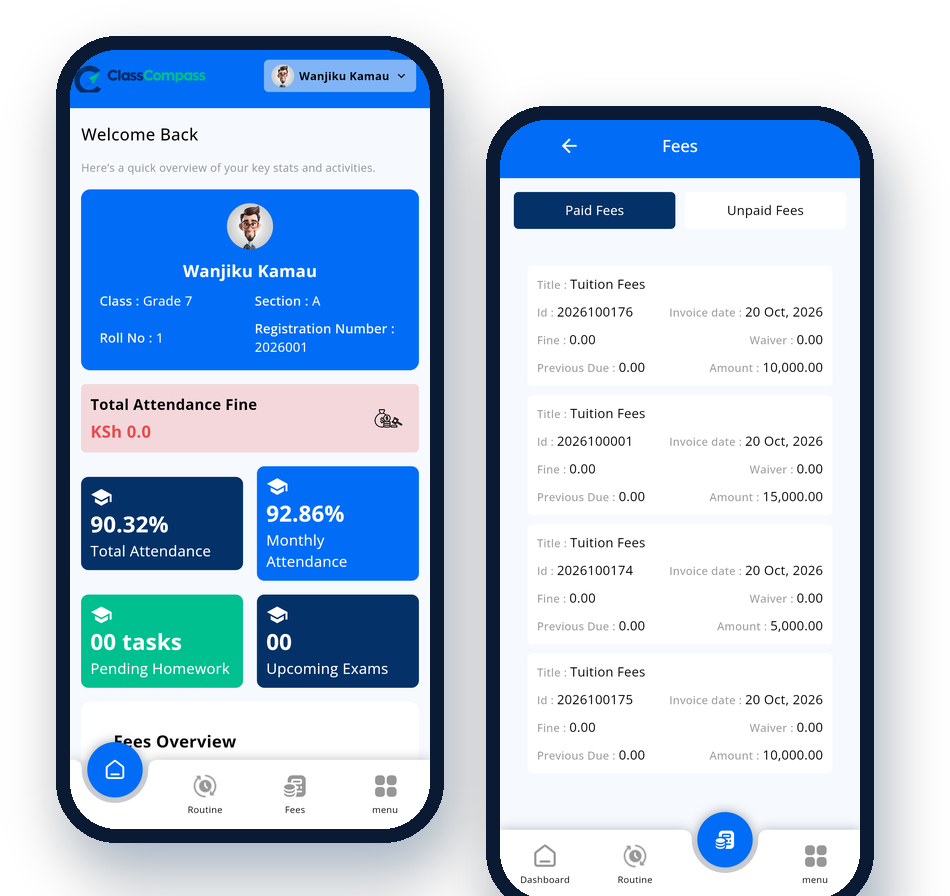
What parents should see in one place
- Attendance. Today's register and the term's attendance percentage. If a learner is marked absent, the parent should know the same morning, not at the end of the month.
- Results and report cards. CBC assessments as they're entered, and the report card at the end of term.
- Homework and timetable. What's due, and when lessons and exams are.
- Fees. The balance per term, every receipt, and a button to pay by M-Pesa.
- Notices and events. Sports days, parent meetings and half-term dates, in one list rather than scattered across chats.
Why groups don't scale
WhatsApp groups work for a quick reminder, but they cause real problems:
- Important notices get buried under replies.
- Parents in several groups (one per child) miss things.
- Personal matters, such as a fee balance or a discipline case, can't go in a group.
- When a teacher leaves, the group's history often goes with them.
A portal sends each family only what concerns their children, and it stays with the school.
Getting parents to actually use it
Most portals fail at adoption, not technology. What works:
- Hand out logins at an event. Set up accounts during admission or at a parents' meeting, and help parents sign in on the spot.
- Use it for something parents want. Fee balances and report cards bring parents in. Publish them in the portal first.
- Keep it fast on cheap phones. If it takes a minute to load over mobile data, parents give up.
- Keep sending SMS for urgent things. An SMS when a learner is absent, or when a payment is received, reaches every parent, smartphone or not.
One login for the whole family
A parent with three children at the school should sign in once and switch between them. Learners get their own login too, for homework, timetables and results.
See what parents see
In the Class Compass live demo, sign in as Parent to see Wanjiku Kamau's dashboard: attendance, fee balance, payment history and notices. Then sign in as Learner to see the same week from Wanjiku's side.